

Turn your backlog into delivered work.
Delivery Autopilot coordinates 30+ AI agents to plan, build, review, test, and fix software changes across your projects, day and night, pausing only for the approvals you choose.
from ticket to production
add or remove per project
/project/mo


Covers the scope of 6+ roles
Built for anyone with more software work than hands.
Whether you have a team, clients, or just yourself, Autopilot moves ideas and backlog items through to completed software work.
Enterprise platform teams
Implementing or extending business platforms such as Salesforce and ServiceNow: new flows, customizations, and configuration changes that pile up behind a small team.
For example: a new approval flow on a ServiceNow instance.
Agencies
Delivering software across several client projects, where every client keeps sending changes and each project needs its own care. Tekunda, a Salesforce consultancy, delivers client work with Delivery Autopilot.
For example: a requested change on a client project.
Internal software teams
Large backlogs and delivery bottlenecks: more requested features and fixes than the team can build, review, and test.
For example: features and fixes waiting in a large backlog.
Solo founders
Building and improving your own product without a team: ideas turn into planned, reviewed, tested changes while you focus on the next decision.
For example: a product improvement from your own idea list.
From a task in your tracker to a tested code change.
Connect a task tracker and a repository. 30+ AI agents plan the change, write the code, review it, run tests, and fix failures. You approve the plan and the production release.
- Architect the change4 files, 2 data flows, 1 human gateRunning
- Build it+142 / -18 across 4 filesQueued
- Dual-AI reviewPrimary and adversarial, 2 findings fixedQueued
- Test and quality gateLint, build, tests, site checksQueued
- Auto-merge and promoteUnder your own branch protectionQueued
Want every step in detail? See the full nine-step workflow.
Delivery is capped by human throughput.
Four bottlenecks decide how fast your backlog turns into shipped software, and each has an answer built into Autopilot.
Problem Backlog moves at human speed. Every ticket waits for someone with context to be free.
Continuous progress
Work continues day and night without you supervising every step. Configured approvals pause the run until you decide.
Problem Routine work eats senior time. Your senior engineers spend their week on predictable changes.
A coordinated team
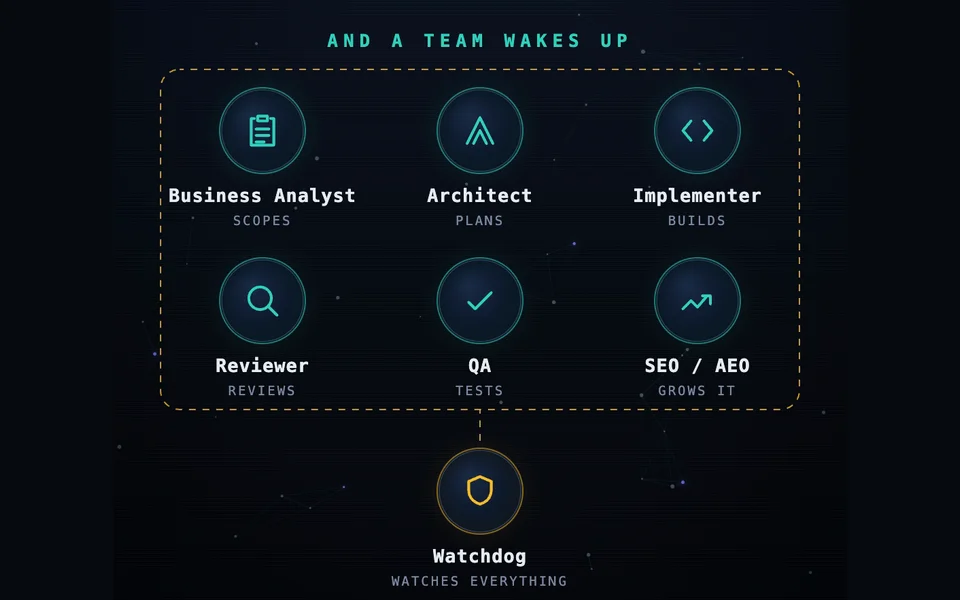
Agents cover analysis, architecture, implementation, review, QA, and growth, with a watchdog overseeing the process. Growth packs are optional and separate from the base plan.
Problem Code review is a bottleneck. Reviews are slow and every merge waits on them.
Quality through correction
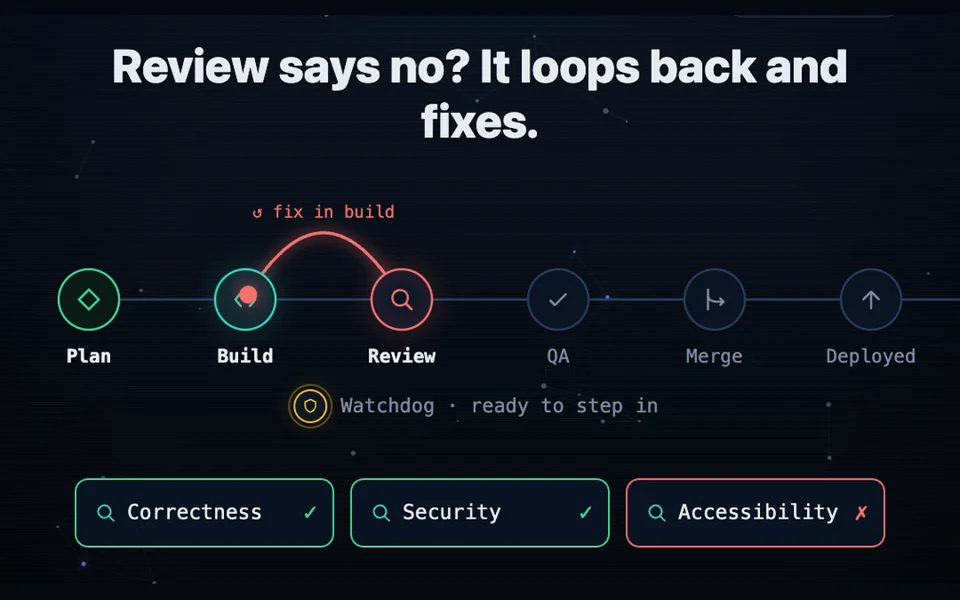
Reviewers catch problems, and failed reviews and QA findings loop back into fixes. When automatic correction cannot resolve a problem, it escalates to you.
Problem Testing does not scale. AI-assisted delivery ships faster than you can test.
Isolation for every ticket
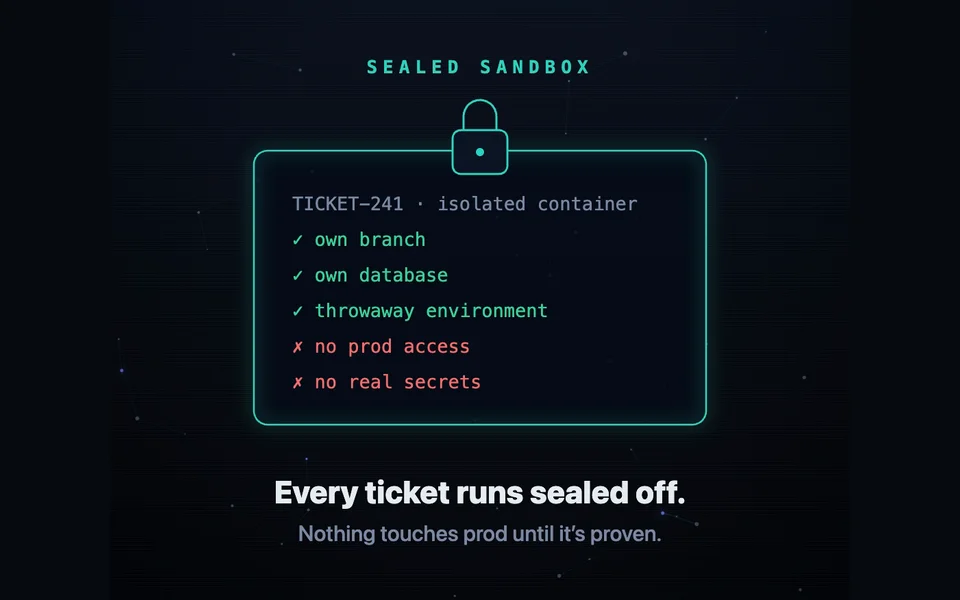
Each ticket works in its own separate environment, so changes are tested before anything reaches production.
Nine steps, configurable human gates.
From ticket to production in nine steps, most of them fully automated end to end.
Set the human gates
Architecture and release are gated by default. Add, move, or remove gates per project to match the oversight it needs.
Pick up the ticket
Autopilot reads the ticket from your tracker, pulls the linked context, and confirms it is ready.
Architect the change
It proposes a file-level plan, data flows, and a test plan before a single line is written.
Build it
The agent implements the approved plan on a branch in your project, following your existing conventions.
Dual-AI review
A primary reviewer and an adversarial reviewer read the diff independently and argue over what is wrong.
Test and quality gate
Lint, build, tests, and site checks return one combined verdict instead of a scatter of signals.
Auto-fix loop
Every failed gate goes back to a fixer agent with the failing log until the run comes back green.
Auto-merge and promote
A green pull request merges itself and promotes to your test environment under your branch protection.
Ship to production
The release waits for a person, then deploys through the same pipeline that produced the change.
Self-healing
Intermittent failures are retried and repaired automatically, so a flaky test never wedges the branch.
Escalate
When a fix stops converging or the risk rises, the run stops and asks for a human.
Ordinary AI coding helps you write code. Autopilot delivers the work.
Everything else covers a slice of the delivery loop. Autopilot covers all of it, end to end.
| Manual deliveryBy hand today | AI coding assistantsIn your editor | CI and merge-queue toolsAfter the code | Delivery AutopilotEnd to end | |
|---|---|---|---|---|
| Starts the moment a ticket is ready | When free | ✗ | ✗ | ✓ |
| Writes the implementation | ✓ | ✓ | ✗ | ✓ |
| Reviews every diff before merge | One reviewer | On request | ✗ | ✓ |
| Security review before the merge | Before release | ✗ | ✗ | Agent pack |
| Runs the full test suite on every change | Time permitting | Locally | ✓ | ✓ |
| Fixes a red build on its own | ✗ | ✗ | Retry only | ✓ |
| Merges, promotes, and deploys automatically | Release windows | ✗ | ✓ | ✓ |
| Docs updated with the release | ✗ | ✗ | ✗ | Agent pack |
| Continuous SEO agents for your website | ✗ | ✗ | ✗ | Agent pack |
| Human gate on architecture before code | ✓ | ✗ | ✗ | ✓ |
| Rollback runs through the same pipeline | Manual hotfix | ✗ | Manual trigger | ✓ |
One plan, priced per project.
You pay a flat monthly fee for every project connected to Autopilot, with your own Anthropic key.
Bring your own Anthropic key. Every connected project is billed monthly, whether or not it runs work that month.
- The full nine-step pipeline
- Dual-AI review on every diff
- Combined test and quality gate
- Auto-fix loop and self-healing CI
- Auto-merge, promotion, and release gate
- Works with GitHub, GitLab, Azure DevOps, or Bitbucket
SEO agent pack
EUR 199 / project / moA continuous SEO engine for your website project: closes content gaps, refreshes decaying pages, and keeps the sitemap clean.
Security agent pack
EUR 199 / project / moA dedicated security reviewer and pen tester on every PR, plus an automatic dependency-CVE audit.
Docs & content agent pack
EUR 149 / project / moKeeps internal docs, customer-facing guides and site copy in sync with every release, through the same review gates.
Visual QA agent pack
EUR 99 / project / moScreenshots every UI change and measures the rendered layout, so a broken component fails the PR instead of your users.
A project is one connected repository.
Indicative pricing, finalized with your pilot.
What Autopilot gives your engineers back.
Enter three numbers and see what Autopilot costs against the work it takes over.
How Delivery Autopilot is billed.
How and when are we billed?
Is it priced per seat or per usage?
Can we cancel?
What does the base plan include?
You've already built half of this yourself.
Autopilot is what your Claude Code or Codex workflow looks like once it runs production grade, across every project.
Beyond one script
A Claude Code or Codex workflow covers one project until its author moves on - Autopilot runs the same discipline everywhere.
Gates already built in
Approval steps, escalation and an audit trail ship ready to use, instead of hand-rolled checks that quietly drift out of sync.
One pipeline, every project
Stop rebuilding the same agent plumbing per project - connect a project and it inherits the whole pipeline, gates included.
No single point of failure
Self-healing, dual review and the auto-fix loop keep working long after the person who wrote your script moves on.
Managed by us, in your environment for Enterprise.
Autopilot runs on our managed infrastructure by default. Enterprise customers can request deployment in their own environment.
Managed infrastructure
Autopilot runs end to end on infrastructure we manage, so there is nothing for your team to host.
Available nowDeployment in your own environment
Enterprise customers can request deployment on their own infrastructure, for strict data residency rules.
EnterprisePlugs into the tools your team already runs on.
Trackers, code hosts and the coding agents, connected on day one.









Security built into every run.
Four guarantees that hold on every pipeline run, from checkout to merge.
Managed by default
Runs on our managed infrastructure, and every merge still goes through your branch protection and existing access controls.
Not used for training
We keep only the run metadata needed to operate the pipeline, and your code is never used to train models.
Dependency CVE audit
Every run audits your dependencies for known CVEs, and a high-severity finding blocks the merge.
Secret scanning on every diff
A committed key or token is caught in review and routed straight back into the auto-fix loop.
Delivery Autopilot, asked and answered.
Where does our code run?
What do humans still decide?
Which trackers and code hosts are supported?
How long does onboarding take?
How do you handle security and access?
What happens to our code and our data?
Put Autopilot on a project you choose.
Book a strategy call and we will scope a pilot on one project and one slice of your backlog.