

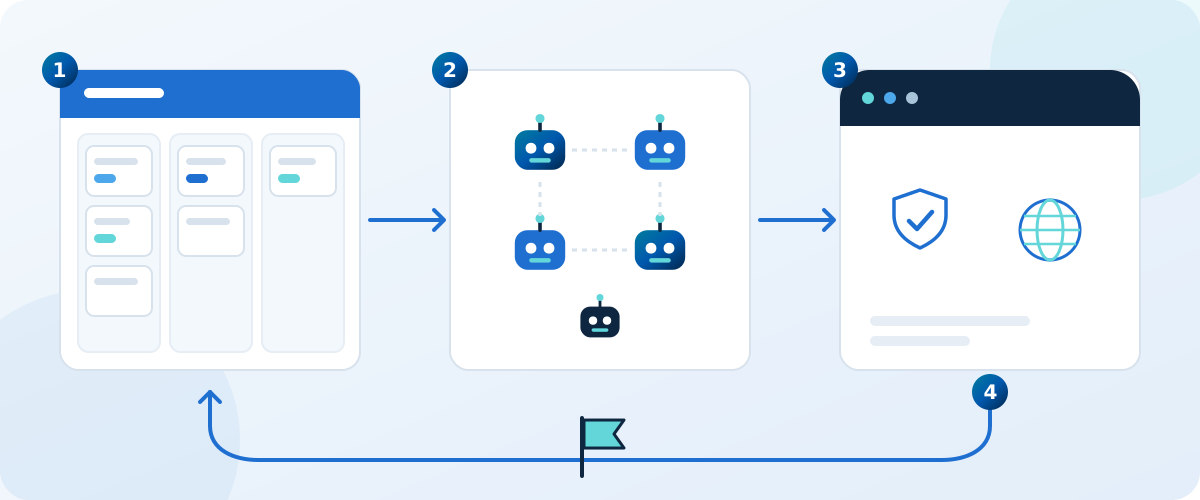
Most companies that sell software delivery tools build their own product the old way and then ask you to trust the tool. We do it the other way round. Dutopilot's own product is built by Dutopilot. Its repository is connected to the hosted service exactly like a customer's would be. Tickets sit on a project board, and agents plan them, build them, review them, test them, fix them and merge them. Every merge to the main branch deploys to production.
Dutopilot's own product, since 29 September
Our first client projects, on the current release since 19 August
This article walks through how that works in practice: the setup, what happens to a single ticket, how dozens of changes from people and agents land on the same main branch every day without queueing behind each other, what happens when something breaks, and what the people on our side still do. It also shows what we measured, and what we learned that you can use in your own team.
A word on what Dutopilot is, so the rest makes sense. Dutopilot is a managed service and software as a service in one. It is a layer above coding agents: it runs Claude Code, Codex, OpenCode and Oh My Pi on your own AI account, on dedicated cloud infrastructure, and every customer gets a Forward Deployed Engineer who sets it up around your backlog and stays with you. Each agent is a Dutopilot virtual team member, and each one can run hundreds of parallel sub-agents, on every plan. You keep the project board you already use. The agents do the delivery work.
Why build the product with itself
There are three reasons, and the first one is not marketing.
The first reason is honesty. A delivery tool that has never carried its own maker's work has not been tested on the hardest customer there is: one that changes its mind daily, files vague tickets, merges in a hurry and notices every slow minute. When our own product waits on a stuck review, we feel it that afternoon. That pressure is a better test suite than any we could write on purpose.
The second reason is feedback speed. When an agent stalls, loops or produces a change we would not accept, the person who can fix Dutopilot is the same person who just felt the problem. There is no support queue between the pain and the repair. A defect we find becomes a ticket on the board right away, and the fix follows through the same pipeline.
The third reason is proof you can inspect. When we say the pipeline holds up under many changes at once, we are describing our own repository, where people and agents merge into the same main branch all day. We are not describing a demo project built to look good.
None of this means every customer should expect our exact setup. Customers choose their own approvals, their own board and their own repositories. What carries over is the method: a ticket goes in, a verified and merged change comes out, and a person steps in only at the gates that matter to you.
See it on your own backlog
Book a call and a Forward Deployed Engineer will walk you through how this setup would look on one of your projects. Or start free with the Solo plan.
The setup: a board, a repository and a clear split of work
The setup is deliberately plain, because a customer has to be able to copy it.
The project board
All work starts as a ticket on a project board. The board is where people say what they want: a new capability, a fix, a change to wording. A ticket is written in ordinary language, the way you would brief a colleague. It does not need to be a specification. If something important is missing, the planning step asks.
The repository
The product's code lives in one repository, which the hosted Dutopilot service reads and changes through a permission grant, the same way it would for a customer. Our repository gets no special back door. If a step works for us, it works through the same path your repository would use.
Each change is a small, separate piece of work that goes straight to the main branch. We do not keep long-lived integration branches or a big combined release change at the end. Smaller pieces mean smaller reviews, easier undoing and no pile-up where one late piece blocks ten finished ones.
What people do and what agents do
The division is simple to say. People decide what is worth doing and where a human must say yes. Agents do the delivery work in between.
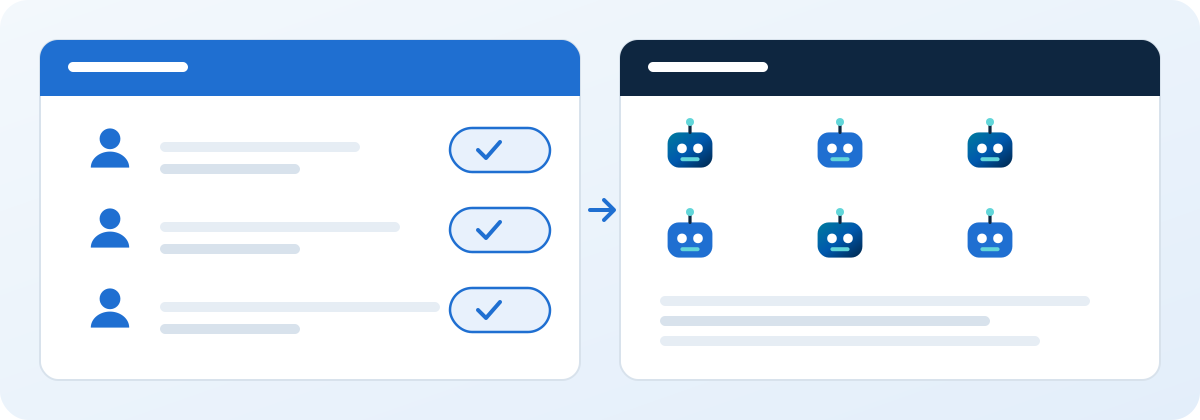
- People: write and prioritise tickets on the board, answer questions an agent could not settle alone, approve the steps they chose to keep behind a human gate, and make product decisions.
- Agents: refine the ticket, plan it, split it when it is large, write the code and the tests, review each other's work, run the quality checks, repair failures, merge and deploy.
Behind this sit your AI accounts. Dutopilot runs Claude Code, Codex, OpenCode and Oh My Pi on your own subscription or key, so the cost of the AI work goes to an account you control and you see exactly where it goes. The agents in your plan do not share one narrow pipe. Each plan agent behaves like a Dutopilot virtual team member that can hand parts of a job to as many parallel sub-agents as the work needs.
A ticket's life, step by step
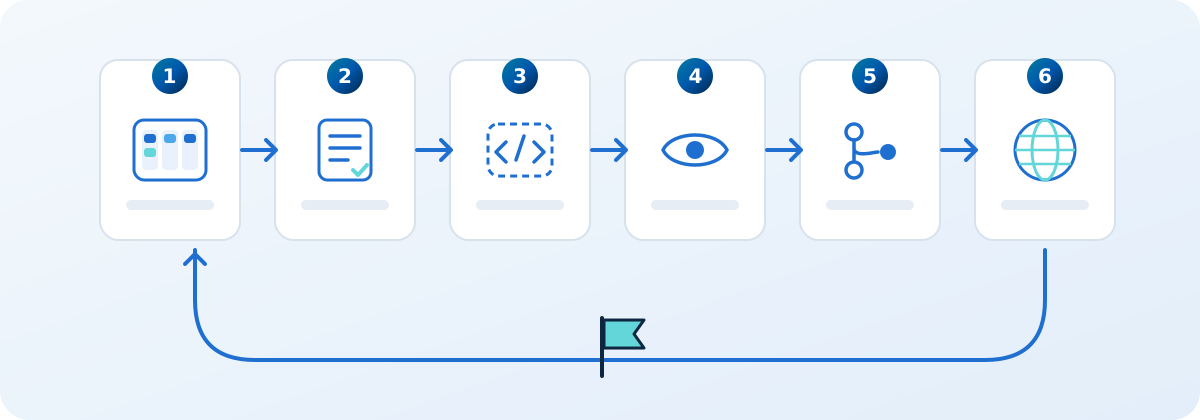
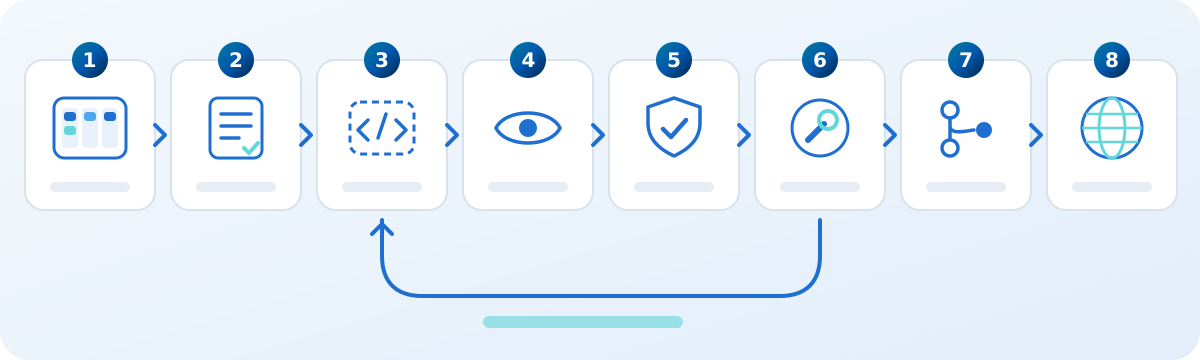
Here is what happens to one ticket, from the moment it is ready to the moment it is live. A ticket passes through nine stages in all: architect, planner, implementer, gate, three reviewers, autofixer and QA. We describe the path in the order you would see it. The seven numbered steps below group those nine stages, and the eight cards in the picture show the same journey.
1. Refining and planning
When a ticket is marked ready, an agent reads it together with the parts of the repository it touches. Its first job is not to write code. Its first job is to check that the ticket can be built: is the goal clear, is anything contradictory, is a decision missing that only a person can make?
If the ticket is clear, an architect agent and a planner agent turn it into a plan: what to change, in which order, what could go wrong and how to know it worked. A large ticket is split into smaller tickets, each one something that can be built, reviewed and shipped on its own. The split matters: small tickets finish faster and cost less to review, and a problem in one does not hold back the rest.
If something only a person can decide is missing, the agent asks, in plain words, on the ticket. A reply in the person's own words is enough. Nobody has to learn special phrases.
2. Building in an isolated sandbox
Building happens on dedicated cloud infrastructure, in a sandbox made for that one ticket. The sandbox gets a fresh copy of the repository, does the work and is thrown away afterwards. Nothing from one ticket's run can leak into another's.
Inside the sandbox, a coding agent (Claude Code, Codex, OpenCode or Oh My Pi, on your account) writes the change and the tests that go with it. Because the work is split across sub-agents, one can handle the data side while another handles the screen, and a third writes the tests, all in the same sandbox. Before it writes anything, the sandbox merges the latest main branch into its working copy. We come back to why that moment matters in the section on working at scale.
3. Independent review
When the build is done, the change is opened as a pull request, which is the standard way to propose a change for review. The reviewers are separate agents that did not write the code. They read the change with fresh eyes, compare it with the ticket and with the plan, and look for mistakes, missed cases, risky shortcuts and changes that wander beyond the ticket.
The point of separating the reviewer from the author is the same as with people. An author reads what they meant to write. A reviewer reads what is actually there.
4. Quality gates
Alongside the review, a set of quality gates run. A gate is an automatic check with a clear pass or fail: the tests, the type and style checks, a check that the change touches what the plan said it would, and checks on things like security and the look of the pages.
5. The self-repair loop
When a reviewer finds a problem or a gate fails, the ticket does not go back to a person. It goes to a repair stage. A fixing agent reads the exact failure, changes the code, and sends the change back through review and the gates. This loop repeats as long as it is making progress. If the same failure keeps coming back without progress, the approach changes instead of trying the same thing again, and if it still cannot be resolved the ticket stops with a plain explanation that a person can act on.
6. Merge
When every gate is green and the review is clean, the change merges into main. Merging is squash-and-merge, so each ticket becomes one clean entry in the history, which makes it easy to read and easy to undo. If you chose to keep a human approval before merging, the ticket waits for that approval instead and tells the person exactly what they are approving.
7. Deploy
For our own product, a merge to main is a release: the deployment starts on its own and puts the change into production. The ticket is closed only when the work is actually live and checked, not when the pull request merges. If a deployment check fails, that is treated like any other failure: it comes back as work for the agents, not as a message that waits for a person to notice. On client projects the work stops at staging or test, a person releases, and the ticket finishes there.
A worked example (illustrative)
Illustrative example. This is a made-up ticket to show the flow. It is not a record of one specific change.
The ticket: "Show the next billing date on the account page, so customers stop asking support when they are charged next."
Planning. The agent reads the ticket and the account page code. It notices the ticket does not say what to show for customers on a free plan, and asks one question on the ticket. A product person answers in one sentence: show nothing. The architect writes a short plan: add the date to the account data, show it on the page, hide it for free plans, add tests for both cases. The change is small enough to ship as a single ticket.
Building. A sandbox starts with a fresh copy of the repository and merges the latest main into it. A coding agent adds the field, a second sub-agent updates the page, a third writes the tests. It opens a pull request.
Review and gates. A reviewer agent points out that the date is shown in one fixed format, even though the product speaks five languages. A gate also reports a missing test for a customer whose plan renews on the last day of a month. Both findings go to the repair stage.
Repair. A fixing agent uses the language-aware date formatting the product already has, and adds the missing test. The change goes through review and the gates again, and everything is green.
Merge and deploy. The change merges into main, the release goes out and the check on the live page passes. The ticket closes. No person opened a code editor, and the only human input was one sentence on the ticket.
Want this loop on your project board?
A Forward Deployed Engineer sets up the board, the repository and the approvals you want, and stays with you while the agents take over the delivery work. Book a call, or start free with the Solo plan.
Working at scale: many tickets, many people, one main branch
A single ticket moving through a clean pipeline is the easy case. The real test is many tickets at once while people also merge into the same repository.
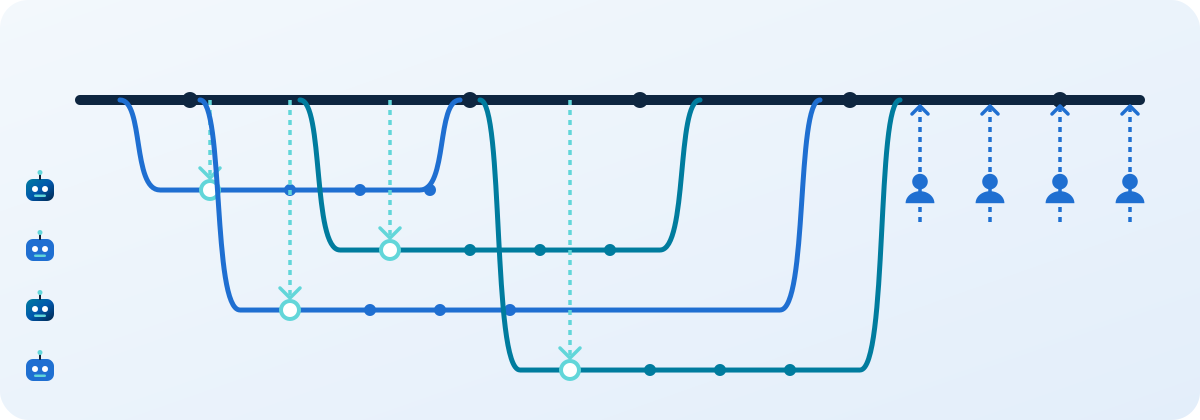
On our repository, many tickets are in flight at the same time, each in its own sandbox, and our own people merge their own changes into main throughout the day. Every one of those merges changes what main looks like. A system that works only when one change moves at a time would spend most of its life waiting. Each Dutopilot virtual team member can run hundreds of parallel sub-agents, on every plan.
Why nothing waits for a branch to catch up
A common rule in software teams says a branch must be up to date with main before it can merge. With a handful of people that is a small nuisance. With dozens of changes arriving all day it becomes a trap: the moment any change merges, every other open change is out of date again, and has to be refreshed and re-checked. Under heavy traffic that loop never ends, and people spend their day pressing update buttons.
We refuse that rule on purpose. Instead, every agent merges the latest main into its own work at the moment it needs it: before it writes code, and again right before the final checks. The agent establishes for itself that its work is compatible with the current main, instead of waiting for anyone to refresh its branch.
If main moved while the work was in progress and the two changes do not touch each other, nothing more is needed. If they do collide, the agent resolves the conflict in its own copy, reruns the checks, and carries on. The cost is paid by the one change that actually collided, and only when it collides. Everyone else keeps moving.
The same idea applies to every shared resource
We apply the same test to everything that several changes share: the pool of sandboxes, the number of requests we may send to the code host, the AI accounts, the queue of work. The questions are always the same. Does this still work with dozens of writers at once? Does every wait end on its own? Does the cost of each cycle grow with the amount of active work, rather than with the size of the whole backlog?
A design that is correct for one ticket at a time but stalls or needs a person when many tickets arrive is, for us, a wrong design, however safe it looks. That is the first test every decision on our own product has to pass, and it is the reason the setup holds up when a customer connects a busy repository.
How many tickets one AI account can carry is in Today's numbers, further down.
When things go wrong
Things go wrong in any delivery pipeline. A test that was already flaky fails, a service is briefly unavailable, an agent misreads a ticket, a change collides with another. What matters is what happens next, and whether a person has to notice first.
Self-repair first
Most failures are handled by the repair loop described above. A failed check is read, understood and fixed by an agent, and then checked again. On our first client projects, agents repaired 150 stage failures by themselves (the figures are in the numbers section). Each of those is a moment where, in a more traditional setup, a person would have had to notice a red build, work out whose problem it was and chase a fix.
Defects Dutopilot finds in itself become tickets
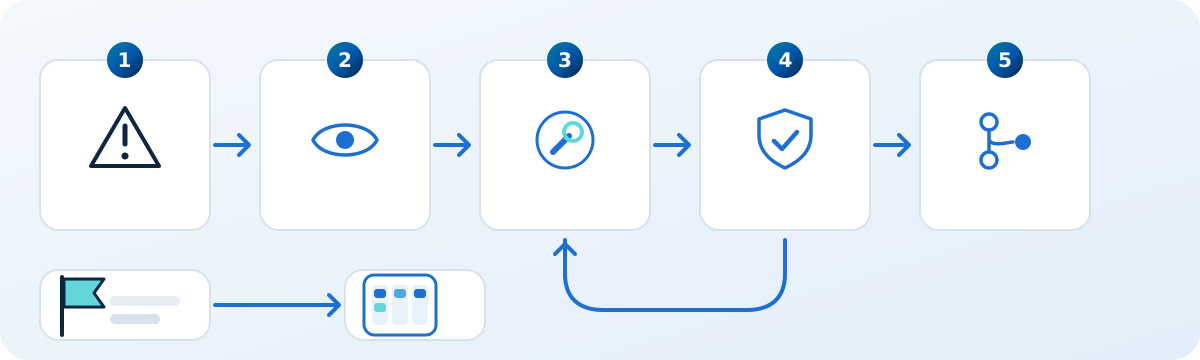
Dutopilot watches its own behaviour. When it detects a defect in itself, for example a ticket that sits waiting for no reason, or a step that keeps failing the same way, it reports the problem as a ticket on its own project board, tagged so it is clear that it came from the system. That ticket is then planned, built, reviewed and merged by the same agents like any other. The loop in the diagram at the top is real: production behaviour flows back into the board, and from there into the next change.
This is also why we trust the setup in our own repository. A problem does not live in somebody's memory or in a chat thread. It is a ticket, with an owner, a plan and a status.
Some real examples of defects Dutopilot reported against itself and then fixed. It filed its own report that a scheduler loop had hung, and fixed it. The dashboard once told a customer to fix their setup when the fault was Dutopilot's own, and it corrected that so the right party is blamed.
Stops a person can resolve alone
Sometimes the right move is to stop and ask. A decision is missing, a choice has consequences, or a gate you selected needs a human. When Dutopilot stops, we hold it to a standard we call self-serve: the person reading the notice must be able to resolve the stop on their own, with no documentation and no help from us.
- The message says in plain words what happened, before any technical detail.
- It says whose problem it is: their change, or the setup.
- It offers the one thing they can do. Where there is a sensible default, it takes it and tells them, with an easy way to undo.
- A reply in the person's own words works. There is no special command and no hand editing of anything.
The technical detail (the name of the check, the setting involved) comes last, for the administrator. A notice that must be shortened loses the technical detail first and never the plain explanation.
What people still do
Automation that pretends people are unnecessary is not credible, and it is not what we built. People still do the three things that only people can do.
- Choose the work. What goes on the board, in what order, and what is not worth doing at all. Priority is a business decision. An agent can estimate effort. It cannot know what your market needs this quarter.
- Approve where you chose to. You pick which steps stay behind a human gate: a plan, a design, a merge, a release. A gate you select is a real gate. The agents wait for it and tell the approver exactly what they are approving. Steps you did not select are decided by Dutopilot when it is confident, with a clear record and an easy way to reverse it.
- Make product decisions. Whether a feature exists, how it should feel, which trade-off to accept. Agents turn those decisions into working software. They do not replace the judgment behind them.
The effect is a different kind of workday. People spend their time on decisions and priorities. They read short explanations instead of long diffs. They stop babysitting builds.
The numbers
Numbers only help if they are specific about what they count. We give two separate sets and we do not blend them.
Across our first client projects
These figures come from our first client projects. They were not measured on Dutopilot's own repository, and we do not present them as if they were. Numbers for our own repository are measured separately and appear in their own box below.
Since June 2026
Since June 2026, agents have merged 127 tickets and completed 539 agent tasks across our client projects. Those projects are serpent.cloud, the website of a services company, and a monorepo that combines Salesforce and a native iOS app. The last two are not named here. Each project has its own setup and its own approvals, and on client projects the work stops at staging or test and a person decides when to release. Read the figures as breadth, not as one project's pace.
On the current release, since 19 August
A second, narrower set was measured on the same client projects with the current release, from 19 August onwards:
- 0.4% of commits on the work branches were written by a human. The rest were written by agents.
- 2% of tickets needed a human approval.
- 54 minutes was the median time from first commit to merge.
- 150 stage failures were repaired by the agents themselves.
- 9 stages make up a ticket's path.
The low share of tickets needing an approval comes from how those projects configured their approvals. It is a setting, not a ceiling. If you want a person on every merge, you can have that, and the numbers will then look different, by choice.
Today's numbers
- One Claude Ultra account delivers about 50 medium-sized tickets a week (about 25 files each), which is about 200 a month, when enough Dutopilot virtual team members run on it.
- 8 Dutopilot virtual team members can finish about 50 tickets in a single day, which uses about one account's weekly AI allowance.
- Since 29 September, Dutopilot's agents have merged 497 changes into Dutopilot's own product on their own, closing more than 375 tickets.
- On the Solo plan, the smaller Dutopilot team (up to 3 virtual team members) keeps one account at about 100 tickets a month. On the Team plan it is about 200 a month for each Claude Ultra account you connect.
We improve Dutopilot every day, so these are today's figures (November 2026), not an average over past months. The capacity figures are for the product, not measurements from client projects.
Lessons learned, for your team
These are the lessons from building this way that transfer to any team that wants to hand delivery work to agents.
Write tickets for a capable colleague
The quality of the output follows the quality of the ticket. A ticket that states the goal, who it is for and how you will know it worked gets built well. A ticket that says "improve the dashboard" gets a clarifying question first. That is a good outcome, and it is cheaper than a wrong build.
Keep every change small
Small tickets pass review faster, fail less often and are easy to undo. When a piece of work is large, the planning step splits it. Do not fight that split. A large change is a risk you would otherwise carry for days.
Let separate agents review
The agent that writes the code should not be the agent that approves it. Independent review catches the mistakes the author cannot see, and the findings go straight into the repair loop instead of onto a person's desk.
Make checks plain code
Anything with a clear right answer, such as whether a test passed or whether a file changed, should be decided by ordinary software, not by a model's opinion. Use models for the judgment tasks: reading a change, deciding whether it matches the ticket.
Design for many at once from day one
A pipeline that is fast for one ticket and stuck for ten is not fast. Test every rule against the busy case: no waiting for a branch to be current, no shared slot that is never released, no wait that needs a person to end it.
Choose your human gates on purpose
Decide which steps need a person and make those gates real. Everything else should move on its own with a clear record. A gate that is selected but easy to bypass teaches people to ignore gates.
Treat a stop as a message to a customer
Every time the system stops, write the notice as if a person who has never heard of the tool will read it. If they cannot act on it alone, the notice is not finished.
What this means for your team
You do not have to run a setup like ours to benefit from it. The practical version is a managed one.
You keep your project board and your repositories. Dutopilot connects to them (Jira, Linear, Notion, GitHub Issues or Azure DevOps for the backlog; GitHub, GitLab, Bitbucket or Azure DevOps for the code; Slack for notices), and your own AI account pays for the AI work, so the cost stays in your hands. The agents run on dedicated cloud infrastructure that we manage, and each ticket gets its own sandbox. Each Dutopilot virtual team member on your plan can orchestrate hundreds of parallel sub-agents, on every plan. The number of tickets in flight follows how many Dutopilot virtual team members your plan has (Solo up to 3, Team up to 15, Enterprise no limit) and your approvals. Plans are priced by Dutopilot virtual team members, not by users: your whole team can use Dutopilot.
The Forward Deployed Engineer
Every customer gets a Forward Deployed Engineer, an engineer from our side who works with you rather than a support desk you queue behind. They connect your board and repositories, read your codebase and your conventions, set up the checks and approvals you want, and tune the agents to your way of working. They also stay after launch: they watch how your first tickets flow, adjust where agents stall, and help you decide when to loosen or tighten a gate.
In practice, that means you get Dutopilot virtual team members and an engineer who knows how to make them work in your codebase, instead of a tool you have to learn alone. The best first step is small: one project, a few tickets and the approvals you are comfortable with.
Start with one project
Book a call to see how the setup would look on your repository, or start free with the Solo plan.
Frequently asked questions
Does Dutopilot really build Dutopilot?
Yes. The product's own repository is connected to the hosted Dutopilot service like a customer's. Tickets on its project board are planned, built, reviewed, tested, fixed and merged by agents, and every merge to main deploys to production.
Are people involved at all?
Yes. People choose the work, approve the steps they decided to keep behind a human gate, and make product decisions. Agents do the delivery work between those points.
What happens when an agent gets something wrong?
A reviewer or a quality gate catches it, and a fixing agent repairs it and sends it back through the checks. If it cannot be resolved, the ticket stops with a plain explanation that a person can act on alone.
Can I run the same setup on my own backlog?
Yes. You keep your project board and repositories, and Dutopilot runs Claude Code, Codex, OpenCode and Oh My Pi on your own AI account. A Forward Deployed Engineer sets it up around your backlog and the approvals you want.
How do many tickets and many people merge into one main branch?
Each agent merges the latest main into its own work at the moment it needs it, instead of waiting for its branch to be refreshed. That way no change waits for another, and a busy repository keeps moving.